
Thank you for your interest in Trellis! While the current version of Trellis was developed with cutting edge technology for its time, the web ecosystem has changed over the years. Pagespeed tech, accessibility, SEO and user experience has continually evolved and requires new solutions.
The Trellis pagespeed and image optimization API is shutting down on October 20, 2026.
We recommend that you migrate your site to Trellis 2.0 now.
With Trellis 2.0, we’ve integrated Trellis ad tech into the industry’s leading content solutions at Feast.
Upgrade to Trellis 2.0
Upgrade your site to Trellis 2.0 to get:
- a modern homepage layout
- improved category pages
- index pages to better organize your categories
- optimized category grids
- scheduled categories to automatically surface relevant posts around holidays or seasons
- premade block patterns to showcase your content and calls-to-action
- breadcrumb optimization
- WordPress admin enhancements and fixes
- optimized table of contents
- improved image thumbnail management to reduce disk space usage moving forward
- no-code hook integration to easily insert content
- 40+ one-click optimizations
- customizer options to make styling your site simpler
Sunset timeline
We’re sunsetting the Trellis API on October 20, 2026, including the image optimization and pagespeed optimization technology, because there are more modern – better – options now available that all publishers should migrate to.
- October 20, 2025 – all subscriptions and licenses will remain active, and renewals will happen at no cost until September 29, 2026 (1 full year), so that you can keep using Trellis as-is if you want, at no cost
- October 20, 2026 – the Trellis API will shut down, and new image and pagespeed optimizations will cease, but Trellis themes will still operate normally
- Now until October 20, 2027 – all Trellis customers can sign up for the Feast Plugin and get a free migration any time in the next 2 years
Current Trellis themes will continue to work as-is after the Trellis pagespeed API shutdown on October 20, 2026. Your site will not break.
However, we recommend all sites migrate to the new Trellis 2.0 solution as soon as possible to refresh their sites to modern standards and tech solutions.
New themes!
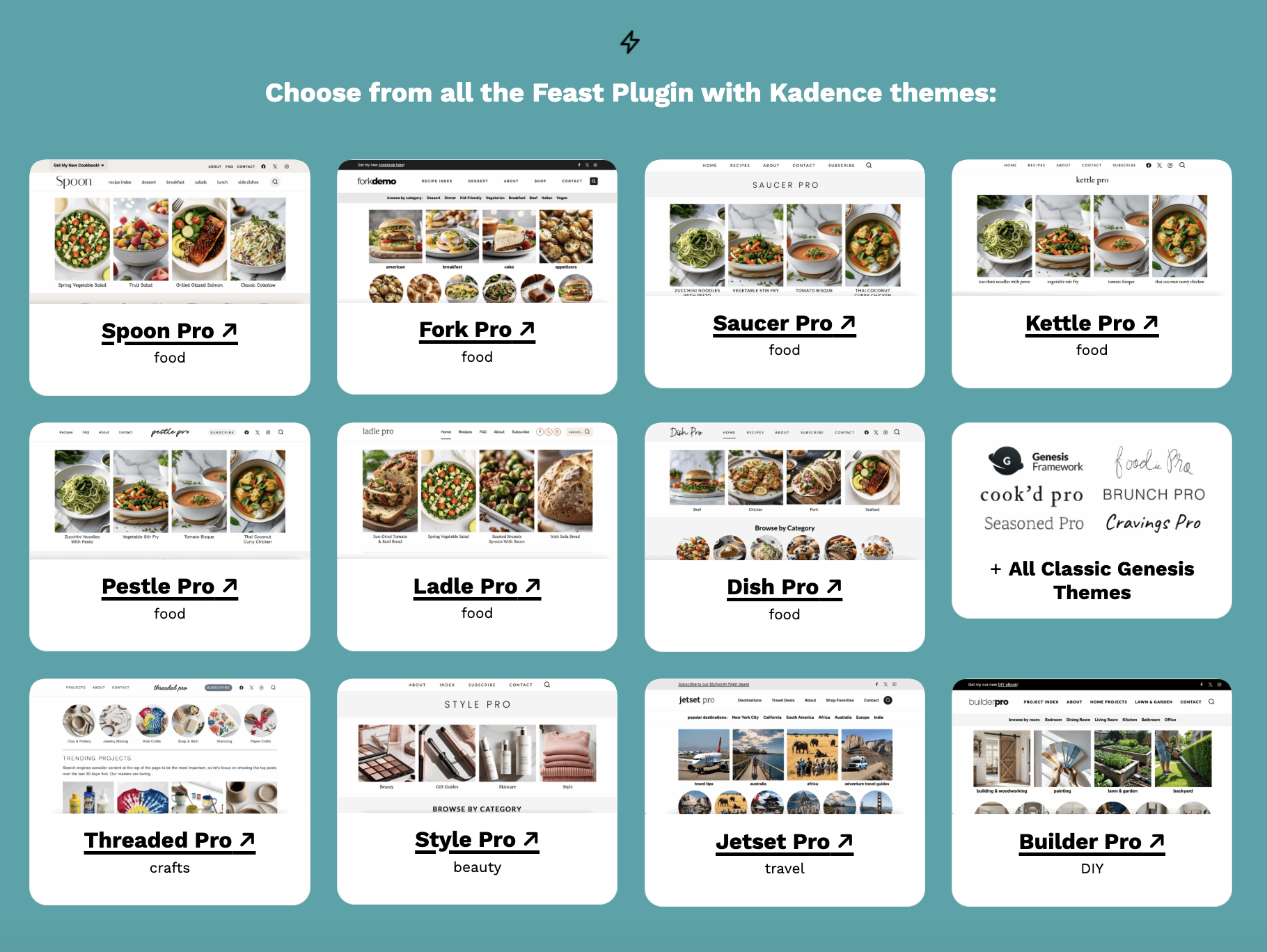
11 new themes are available, including:
- 7 new Kadence themes for food sites
- 1 new Kadence theme for crafting sites
- 1 new Kadence theme for fashion sites
- 1 new Kadence theme for travel sites
- 1 new Kadence theme for DIY sites
Q&A
What’s happening to Trellis?
Trellis is continuing to function as-is in maintenance mode with full support for current Trellis functionality, until API shut down on October 20, 2026.
Until then, all users with an active subscription will no longer be billed, but will keep an active subscription.
All previous Trellis ad tech has now be merged into the Feast setup, and we recommend all users migrate before the API shutdown.
What happens when my Trellis subscription expires?
Your site with the Trellis theme will continue to function as-is, and any pre-existing optimizations will remain in place. However, any content changes will no longer receive the image and CSS optimizations that come from the Trellis subscription.
All Trellis subscriptions as of October 20th 2025 renew at $0 until the Trellis API is shut down on October 20th 2026. There is no need to cancel a subscription as you will not be billed.
What support is included if I migrate to the Feast Plugin?
You’ll receive support for theme-related issues when following our recommended setup and best practices. Any plugins, javascript or configurations that go against our recommendations are not supported. This list is essentially the same as current Trellis.
Where technical issues fall outside the scope of theme support, the team is happy to provide recommendations for third-party plugins and service providers.
Is the Kadence + Feast Plugin setup comparable to Trellis on pagespeed?
Yes! Through our partnership with Mediavine, we’re including an unlimited license for Shortpixel (image optimization) and WP Rocket (CSS + JS optimization) to sites migrating from Trellis, while available.
Both of these plugins include industry-leading optimizations that keep up with current browser standards and technology.
You also get further pagespeed optimization options, such as Skip Lazyloading first image and an additional fetchpriority integration.
Similar to Trellis, we’re not able to guarantee pagespeed results with third-party scripts or plugins, which aren’t related to the theme. See the pagespeed documentation and plugin audit page for more information.
What Trellis technology is included in the Feast Plugin?
We’ve automatically integrated Trellis’ ad optimization technology into our setup, which helps to ensure the site is earning optimally when following our recommended setup.
Can I migrate my site to the Feast Plugin myself?
Yes! You can follow the Feast Plugin Setup instructions to do this yourself. However, each subscription coming from Trellis has 1 free migration (a $399 value) to save you time and effort.
For Trellis users with more than 1 site, you can purchase additional Theme + Plugin Setup services from Feast, or do it yourself. The cost of these additional migrations is partially offset by Feast’s flat $249/year license for unlimited personal sites.
Is the migration seamless?
Trellis 2.0 shares a very similar theme philosophy, so sites following the Trellis guidelines for scripts and plugins should not experience any issues when migrating to the Feast setup.
In fact, we have seen no issues at all for sites that have migrated from Trellis to Trellis 2.0 that were following the original Trellis guidelines.
However, some non-standard setups, such as plugins or customizations, may require workarounds. Review the plugin audit and pagespeed documentation for pagespeed optimization resources and troubleshooting.
What themes are available?
The Trellis migration service converts any Trellis theme over to one of our Trellis 2.0 themes with full Trellis ad technology integrated.
Can I use this on a multisite setup?
Unfortunately we do not support multisite and recommend you find another setup.
Can I use this on my travel site?
Yes! Trellis 2.0 offers huge advantages to travel sites and we have travel-specific themes available – see the travel page.
How do I manage my Trellis subscription?
We’ve moved the Mediavine Marketplace to TrellisWP.com and your account and subscription have been moved there. See the Trellis Dos for frequently asked questions.
All Trellis subscriptions as of October 20th 2025 renew at $0 until the Trellis API is shut down on October 20th 2026. There is no need to cancel a subscription as you will not be billed.
How do I update my custom theme?
Custom themes are the responsibility of the developer who customized them. No two developers do things the same way, which makes it impossible for anyone else to effectively support custom themes. This means that theme updates/changes need to be done by the original developer.
Customizations are rarely done in a way that is compliant with best practices for SEO, accessibility, pagespeed and user experience. This means that changing or updating a theme is an opportunity to revert to best practices.
If you want to keep a custom theme, any updates or theme changes will need to be redone by the original developer.
Do I need to use the Trellis 2.0 recommended pagespeed setup?
With the Trellis 2.0 setup, you can choose not to use Shortpixel and WP Rocket, if you want to self-support and troubleshoot issues related to images and pagespeed. The benefit of using Shortpixel and WP Rocket is that there are thousands of sites using an identical setup and if an issue arises, it will typically be fixed faster and cheaper than doing it yourself.
If I already have the Feast Plugin, do I still get a migration?
Yes! If you already have the Feast Plugin active on a Trellis theme, you still get a theme migration from Trellis to Trellis 2.0.
How does Trellis 2.0 help save disk space?
Trellis 2.0 registers fewer thumbnails, and drops support for webp, without impacting pagespeed. This means that each new image you upload will use less disk space, which reduces the need to upgrade hosting.